In this article
- What does Stan Store cost in 2026?
- Why do creators look for a Stan Store alternative?
- What are the best Stan Store alternatives in 2026?
- Which Stan Store alternative is cheapest?
- How do you choose the right Stan Store alternative?
- How do you switch from Stan Store without losing sales?
- Frequently asked questions
The best Stan Store alternative depends on what you sell and how much you sell each month. If you want the closest all-in-one swap, Beacons Creator Plus matches Stan's 0% seller fee for $30 a month. If you would rather pay nothing until you make a sale, Payhip, Gumroad and Kit charge per transaction instead of a subscription. If courses are your main product, Podia is built for them.
Stan Store is a good product. It charges no transaction fees and puts a storefront, course builder and booking calendar behind your bio link. The catch is the entry price: $29 a month before your first sale, and $99 a month if you want discount codes, email flows or payment plans. For a creator testing a first product, that fixed cost can be the biggest line on the bill.
This guide compares seven real alternatives using each company's own pricing page, as of October 2026. You will see what each one costs, what it takes from every sale, and which kind of creator it suits.
Key takeaways
- Stan Store costs $29 a month (Creator) or $99 a month (Creator Pro), with 0% transaction fees and a 14-day free trial.
- Beacons is the closest like-for-like swap: free with a 9% seller fee, or 0% on Creator Plus at $30 a month.
- Payhip, Gumroad and Kit have no monthly fee to start, so they cost less than Stan while your sales are small.
- Podia suits course creators, Linktree suits creators who want a familiar link in bio first, and hoo.be suits creators who earn mostly from affiliate links, brand deals and tips.
- Card processing (2.9% + $0.30 per sale on Stripe in the US) applies on almost every platform, including Stan.
What does Stan Store cost in 2026?
Stan has two plans. Both include unlimited digital products and no Stan transaction fee. You pay standard Stripe or PayPal processing on each sale.
| Plan | Monthly | Annual | What it adds |
|---|---|---|---|
| Creator | $29 | $300 a year | Storefront, calendar bookings, course builder, recurring subscriptions, lead magnets, community, analytics, Stan AutoDM for Instagram |
| Creator Pro | $99 | $948 a year | Discount codes, upsells and order bumps, payment plans (Afterpay, Klarna), affiliate management, email broadcasts and flows, Meta, Google, Pinterest and TikTok pixels |
Source: Stan, Stan Store Pricing 2026, updated July 2026. Both plans include a 14-day free trial.
The model is simple: a flat monthly fee, and Stan takes nothing from your sales. That is great value once you sell steadily. It is less great in the months when you sell little or nothing, because the $29 is due either way.
Why do creators look for a Stan Store alternative?
Most creators who switch are not unhappy with Stan's checkout. They leave for one of four reasons:
- The fixed cost comes before the income. If you are still validating a first ebook or preset pack, a pay-per-sale tool costs nothing in a slow month.
- Marketing tools sit on the $99 plan. Discount codes, email broadcasts, automated flows and tracking pixels are Creator Pro features. Some alternatives include email or pixels at a lower price.
- They need more course depth. Course-first platforms add things like drip lessons, quizzes and certificates.
- They do not sell files at all. Plenty of creators earn from brand deals, affiliate links and tips. For them, a full digital storefront is more than they need.
Be clear about which of these applies to you before you compare tools. The right choice for a coach selling calls is different from the right choice for a beauty creator whose income is mostly affiliate commission.

What are the best Stan Store alternatives in 2026?
Here is the short list, with the entry price and the fee each platform takes from a sale. Card processing is extra unless noted.
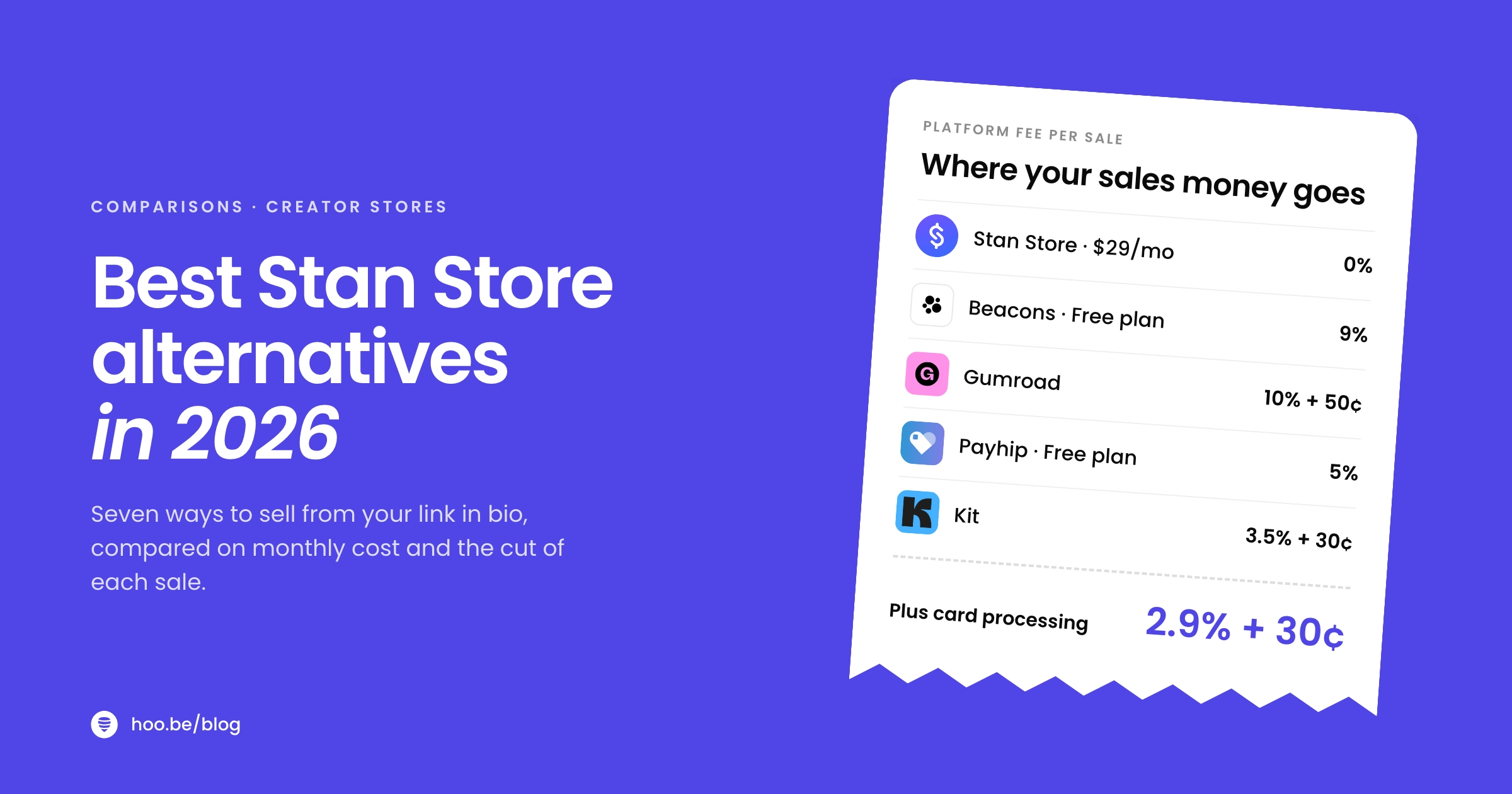
| Platform | Starts at | Platform fee on sales | Best for |
|---|---|---|---|
 Beacons Beacons | Free | 9% on Free and Creator, 0% on Creator Plus ($30/mo) | An all-in-one swap with media kit and email |
 Linktree Linktree | Free | 12% Free, 9% Starter and Pro, 0% Premium ($35/mo) | A familiar link in bio with selling built in |
 Gumroad Gumroad | No monthly fee | 10% + $0.50 per sale (30% via Discover) | Testing a first product with zero fixed cost |
| Payhip | Free | 5% Free, 2% Plus ($29/mo), 0% Pro ($99/mo) | Digital downloads with every feature on every plan |
| Kit | Free | 3.5% + $0.30, processing included | Creators who sell through an email list |
| Podia | $42/mo, billed yearly | 5% on Mover, 0% on Shaker and up | Courses, communities and coaching |
 hoo.be hoo.be | Free | Tips: 9% Free, 5% Pro, 0% Premium | Affiliate links, brand deals, tips and events |
Prices and fees from each platform's pricing page or help centre, October 2026. Monthly billing unless noted.
Beacons: the closest all-in-one swap
Beacons covers most of what Stan does and adds a few things Stan does not. The free plan includes a customizable link in bio, auto-updating media kits, courses with video hosting, Smart Reply auto-DMs and five email automations. You can sell on the free plan, but Beacons takes a 9% seller fee.
Creator Plus at $30 a month ($300 a year) removes the seller fee and adds buy now, pay later, unlimited email sends, memberships and a free custom domain. That is $1 more than Stan Creator for a similar 0% model, with email marketing included. Beacons' help centre also lists a $10 Creator plan and a $90 Creator Max plan for teams. If you are weighing Beacons itself, our Beacons alternatives guide covers the other side of the comparison.
Linktree: a familiar link in bio that can sell
Linktree is the best-known link in bio tool, and it now sells digital products and courses (the courses are powered by Kajabi). The trade-off is fees. Linktree's plan table lists a 12% fee on the free plan, 9% on Starter ($8/mo) and Pro ($15/mo), and 0% on Premium ($35/mo, or $30/mo billed yearly). Stripe processing is extra on every plan.
Linktree makes sense if your page is mainly links and you sell one or two products on the side. If selling is the main event, compare it with Beacons Creator Plus, which reaches 0% for less. Our Linktree alternatives roundup goes deeper on its other plans.
Gumroad: no monthly fee, ever
Gumroad charges nothing until you sell. Then it takes 10% + $0.50 per sale through your own profile or links, plus card processing of 2.9% + $0.30. Sales that come through Gumroad's Discover marketplace pay a flat 30%, which includes processing. Once your paid sales pass $20,000 in a calendar month, new direct sales drop to 5% + $0.50 for the rest of that month.
Gumroad has also been the merchant of record since January 2025, which means it collects and remits sales tax for you. For a first product, that is one less thing to set up. The per-sale cost adds up quickly as you grow, so many creators start here and move later.
Payhip: the same features on every plan
Payhip does not hold features back by plan. Every tier gets unlimited products and unlimited revenue, and you choose how you want to pay: 5% per sale on the free plan, 2% on Plus at $29 a month, or 0% on Pro at $99 a month. PayPal or Stripe processing applies on all three.
That structure makes the maths easy. Payhip Free is cheaper than Stan Creator until you sell about $580 a month (5% of $580 is $29). Payhip is built around your store and product pages, so most creators link to it from their bio page.

Kit: sell where your email list already lives
Kit (formerly ConvertKit) lets you sell ebooks, courses, templates, presets, music and paid newsletters straight from your account. Commerce is available on every plan, including the free one, and the only cost is 3.5% + $0.30 per transaction. That figure already includes payment processing.
Because there is no separate processing fee, Kit is one of the cheapest options on this list at almost any volume. It is the obvious pick if email is already how you sell. Our guide to building an email list from your link in bio shows how to feed it.
Podia: built for courses and communities
Podia is a full course platform rather than a bio page. Every plan includes online courses, digital downloads, coaching, community spaces, events, a website and blog, a custom domain and email. Pricing billed yearly is Mover at $42 a month with a 5% fee, Shaker at $84 a month with no fee, and Earthquaker at $150 a month. Podia offers a 14-day free trial.
Choose Podia when your product is a multi-lesson course or a paid community. It is more than most single-download sellers need.
hoo.be: for creators who earn beyond digital downloads
hoo.be is a link in bio platform first, so it is an honest alternative only if Stan's storefront is more than you need. Your page at hoo.be/yourname is built from blocks: links, carousels, products with a price and shop button, tips, events with tickets, and contact and form blocks. Product links recognise 30 shopping platforms, including Amazon, LTK, ShopMy, Etsy and Shopify, and there are embeds for 19 platforms such as YouTube, TikTok, Spotify and Substack.
Tips run through Stripe from $1 to $500, with a hoo.be fee of 9% on Free, 5% on Pro and 0% on Premium, plus Stripe processing. If you sell files, keep a checkout tool like Payhip, Gumroad or Kit and link to it from your hoo.be page. For plan prices, see hoo.be/pricing.
Which Stan Store alternative is cheapest?
It depends on how much you sell. Here is one realistic month: 50 sales of a $20 product, $1,000 in total, on monthly billing, with each platform's platform fee and card processing added together.
Total cost of $1,000 in sales (50 x $20)
Change the volume and the order changes. At $200 a month, Gumroad and Payhip Free cost far less than any subscription. At $5,000 a month, a 9% fee is $450, and a flat-fee plan like Stan Creator or Beacons Creator Plus wins easily.
Pro tip
Find your break-even before you pay for a plan. Divide the monthly fee by the percentage it removes. Payhip Free versus Stan Creator: $29 divided by 5% is $580 a month. Below that, pay per sale. Above it, a flat fee is cheaper. Our link in bio pricing comparison runs the same maths for link pages.
How do you choose the right Stan Store alternative?
Start with what you sell, then check the fees at your real monthly volume.
- You sell coaching calls and want everything in one place: Beacons Creator Plus, or stay on Stan Creator. Podia also includes coaching. Our link in bio setup for coaches shows how to lay out a booking page.
- You are testing your first digital product: Gumroad or Payhip Free. No monthly fee while you find out if it sells.
- You sell to an email list: Kit. Lowest all-in cost, and selling lives next to your newsletter.
- You sell a multi-lesson course or paid community: Podia.
- You want a link page first and a product second: Linktree or Beacons.
- You earn from brand deals, affiliate links and tips: a link in bio such as hoo.be, with a checkout tool linked in if you add a product later. Our guide to making money beyond brand deals covers the mix.

How do you switch from Stan Store without losing sales?
- List what is live. Write down every product, price, booking type and lead magnet on your Stan page, plus any discount codes and email flows if you are on Creator Pro.
- Keep your customer list. Make sure you have a copy of your customers and email subscribers, so you can keep in touch with buyers after the move.
- Rebuild on the new platform first. Upload files, set prices, connect Stripe or PayPal, and make a test purchase on your phone from start to finish.
- Swap your bio link. Update Instagram, TikTok, YouTube and any other profile in the same session, so no one lands on an old page.
- Tell your buyers. Send one short email with the new links, including where to re-download past purchases if that changes.
- Cancel last. Keep Stan active until a full billing cycle passes with sales running on the new setup, so you avoid a gap in your store.
Watch for
Recurring subscriptions and payment plans do not move automatically between platforms. If you have members paying monthly on Stan, plan how and when they re-subscribe before you cancel.
A link in bio built for how you actually earn
hoo.be puts your links, product picks, tips, events and email signup on one page, with analytics that show what gets clicked. Start on the free plan.
Claim your hoo.beFrequently asked questions
What is the best alternative to Stan Store in 2026?
For an all-in-one replacement, Beacons Creator Plus is the closest match: 0% seller fees, a link in bio, courses, memberships and email for $30 a month. For no monthly fee, Payhip, Gumroad or Kit charge only when you sell. For courses, Podia is the strongest choice.
Is there a free alternative to Stan Store?
Yes. Beacons has a free plan with a 9% seller fee, Payhip Free charges 5% per sale, Kit's free plan charges 3.5% + $0.30 per sale including processing, and Gumroad has no monthly fee and charges 10% + $0.50 per sale. Linktree's free plan charges 12% on digital products.
Does Stan Store take a percentage of sales?
No. Stan charges a flat $29 or $99 a month and no transaction fee on either plan. You still pay standard Stripe or PayPal processing on each sale, as you would on most platforms.
When is a pay-per-sale platform cheaper than Stan Store?
When your monthly sales are small. Payhip Free (5%) costs less than Stan Creator until you sell about $580 a month. Kit's 3.5% + $0.30 includes processing, so it stays cheaper than Stan Creator until several thousand dollars a month.
Is Beacons better than Stan Store?
It depends on your needs. Beacons includes a media kit, email marketing and a free plan, and its $30 Creator Plus plan has 0% seller fees. Stan focuses on a clean checkout and puts discount codes, email flows and pixels on its $99 Creator Pro plan. Compare the features you will actually use.
Can I use a link in bio tool with Gumroad or Payhip?
Yes. Many creators keep their checkout on Gumroad, Payhip or Kit and link to it from a link in bio page. On hoo.be you can add the product as a link or as a product block with a price and shop button, next to your other links, tips and embeds.
Sources
- Stan, Stan Store Pricing 2026: Plans, Costs and Free Trial (updated Jul 2026)
- Beacons, Pricing
- Beacons Help Center, Beacons Pricing Plans
- Linktree, Free, Starter, Pro and Premium pricing
- Linktree Help Center, Understanding transaction and processing fees
- Gumroad, Pricing
- Gumroad Help Center, Gumroad's fees
- Payhip, Pricing
- Kit Help Center, Sell digital products with Kit: overview and FAQs
- Podia, Pricing
- Stripe, Pricing