In this article
- Why look for a Calendly alternative?
- What should you look for in a scheduling tool?
- What are the best Calendly alternatives in 2026?
- Which Calendly alternative is best for your situation?
- How do you add a booking link to your link in bio?
- Should brand inquiries go through a scheduler or a form?
- Where does hoo.be fit in?
- Frequently asked questions
The best Calendly alternatives for creators and coaches in 2026 are Cal.com if you want the most generous free plan, TidyCal if you hate subscriptions, Acuity Scheduling if you sell sessions and packages, and YouCanBook.me if you want the cheapest paid upgrade. Google Calendar's built-in appointment schedules cover the basics for free if you only need one booking page.
Calendly is still a solid tool. Its free plan, though, gives you one event type and one calendar connection, and payments start on the paid Standard plan at $10 per seat per month. If you run a discovery call, a paid coaching session and a brand inquiry call, you hit that wall on day one.
This guide compares the main options on price, free plan limits and payments, using each company's own pricing page as of October 2026. It also covers how to put your booking link where your audience actually finds it: your link in bio.
Key takeaways
- Calendly's free plan allows one event type and one calendar. Taking payments needs Standard ($10 per seat per month, billed monthly).
- Cal.com's free plan includes unlimited event types and calendars plus Stripe and PayPal payments for one user.
- TidyCal has a free plan with paid bookings (1% platform fee) and a $29 one-time lifetime deal.
- Acuity has no free plan but is built for selling sessions, with packages and memberships from its Standard plan.
- Whatever you pick, the booking link only works if people can find it. Put it near the top of your link in bio.
Why look for a Calendly alternative?
Most creators and coaches switch for one of three reasons: the free plan is too tight, they want to take payment at the moment of booking, or they want to stop paying monthly for a tool they use a few times a week.
Here is what Calendly's own pricing page lists in 2026:
- Free: one event type, one calendar connection, one-on-one scheduling and a customizable booking page.
- Standard ($10 per seat per month, billed monthly): unlimited event types, multiple calendars, automated reminders, and Stripe and PayPal payment collection.
- Teams ($16 per seat per month): round-robin scheduling, routing and CRM integrations.
If you only need one type of call and you never charge for it, Calendly's free plan is fine. The moment you want a second call type, a paid session, or a second calendar, every other tool on this list is worth a look.

What should you look for in a scheduling tool?
Before comparing brands, decide what you actually need. A creator booking brand calls has different needs from a fitness coach selling 10-session packs.
Free plan limits that matter
Count your call types. A discovery call, a paid session and a podcast guest slot are three event types. Calendly's free plan covers one. Cal.com and TidyCal cover unlimited event types for free.
Calendar connections
If you keep a personal and a work calendar, you need both checked for conflicts. Free plans from Calendly, YouCanBook.me and TidyCal connect one calendar. Cal.com's free plan connects unlimited calendars.
Payments at booking
Taking payment at booking means you never chase an invoice. Cal.com and TidyCal take payments on their free plans. Calendly needs Standard. SavvyCal needs Premium. Acuity includes payments on every plan.
Packages, intake forms and reminders
Coaches who sell bundles want packages and intake questions. Acuity includes custom client forms on every plan and packages from Standard. TidyCal includes package bookings on its free plan.
A link that looks good on mobile
If you promote your calls on social media, many bookings will come from a phone, often after a tap in your Instagram or TikTok bio. Open your booking page on your own phone before you share it.
What are the best Calendly alternatives in 2026?
Here is the side-by-side view. Prices are each company's published rates in US dollars.
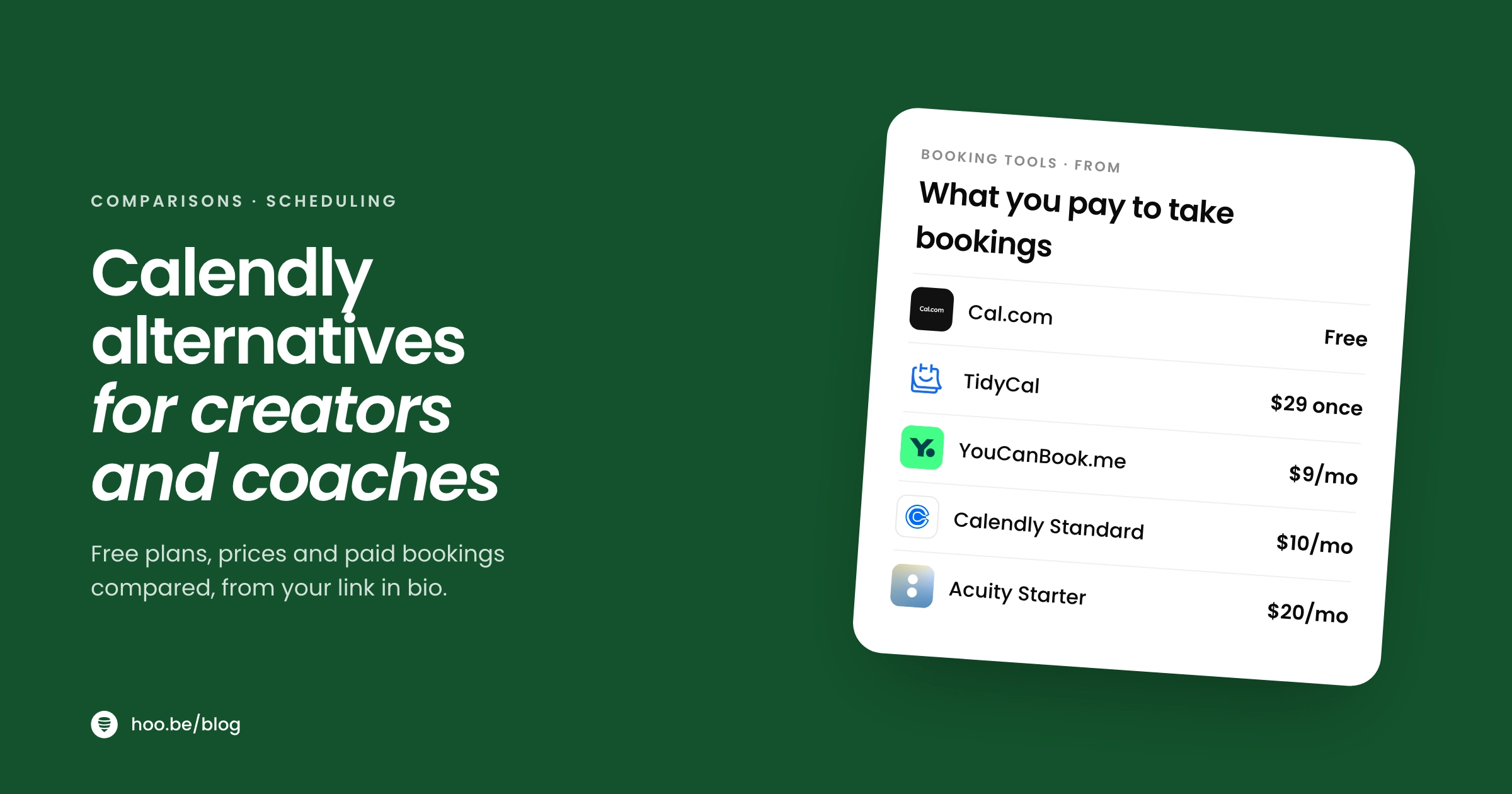
| Tool | Free plan | Cheapest paid plan | Payments | Best for |
|---|---|---|---|---|
 Calendly Calendly | 1 event type, 1 calendar | Standard, $10/seat/mo | Standard and up | Teams already using it |
 Cal.com Cal.com | Unlimited event types and calendars, 1 user | Teams, $12/user/mo billed yearly | Free plan (Stripe, PayPal) | Solo creators who want the most for free |
| TidyCal | Unlimited booking types, 1 calendar | $29 one-time lifetime deal, or Pro at $12/mo | Free plan (1% fee on Stripe) | People who hate subscriptions |
| Acuity Scheduling | None (7-day trial) | Starter, $20/mo or $16/mo billed yearly | All plans | Coaches selling sessions and packages |
| YouCanBook.me | 1 booking page, 1 calendar | Individual, $9/mo | Free plan (Stripe) | A cheap, simple upgrade |
| SavvyCal | None (free trial) | Basic, $10/user/mo | Premium ($17/user/mo) | Polished booking for busy calendars |
 Google Calendar Google Calendar | 1 booking page with a personal account | Eligible Google One or Workspace plan | Premium plans only | One simple call type, already on Google |
Sources: each company's pricing page or help center, checked October 2026. Prices can change, so confirm before you subscribe.
Cheapest paid plan, billed monthly (USD per month)
Cal.com: the most generous free plan
Cal.com is open source and its free plan is the strongest on this list for one person. You get unlimited event types and calendars, email and SMS notifications, more than 100 app integrations, and Stripe and PayPal payments. It even has a one-click import for Calendly event types, which makes switching quick.
Paid plans are for teams. Teams costs $12 per user per month billed yearly and adds round-robin scheduling, routing forms, booking analytics and branding removal. If you work alone, you may never need it.
Choose Cal.com if you have several call types, take paid calls, and want to pay nothing.
TidyCal: pay once, or not at all
TidyCal is built around avoiding another monthly bill. The free plan includes unlimited bookings and booking types, paid bookings, and recurring and package bookings, with one calendar connection and a 1% platform fee on payments through Stripe.
The Individual Lifetime deal costs $29 once (sold through AppSumo) and adds video meeting links, group bookings and up to 10 calendars. If you want a custom domain and no TidyCal branding or platform fees, Pro costs $12 a month or $99 a year.
Choose TidyCal if you sell simple sessions or bundles and want the lowest lifetime cost.
Acuity Scheduling: built for selling sessions
Acuity has no free plan, but it is designed for service businesses. Every plan includes payments through Stripe, Square, PayPal or Venmo, custom client intake forms and email reminders. Standard ($34 a month, or $27 billed yearly) adds text reminders, a waitlist, gift certificates, and memberships and packages. Premium ($61 a month) removes the Acuity logo from your scheduling page.
Choose Acuity if you are a coach, trainer or consultant selling packages and need intake questions before every session.
YouCanBook.me: the cheapest paid upgrade
YouCanBook.me's free plan gives you one booking page and one calendar, with Stripe payments and video meeting links, and a small "Powered for free" credit on your page. The Individual plan is $9 a month ($8.10 billed yearly) and adds a second page and calendar plus custom branding. Professional ($13 a month) adds workflows, analytics and up to 10 booking pages.
Choose YouCanBook.me if you want to look branded for less than Calendly's Standard plan.
SavvyCal: polished, with no free plan
SavvyCal is a paid-only scheduler aimed at people who book a lot of calls. Basic is $10 per user per month with unlimited calendars and scheduling links. Paid bookings and custom domains need Premium at $17. There is a free trial but no free plan.
Choose SavvyCal if you book lots of calls, work with a team or assistant, and are happy to pay from day one.
Google Calendar appointment schedules: free and built in
If you already live in Google Calendar, you may not need another tool. With a personal Google account you can create a single booking page. More than one schedule, accepting payments, and adding schedules to secondary calendars need an eligible Google One or Workspace plan, according to Google's own comparison.
Choose Google Calendar if you need one free call type and nothing else.
Pro tip
Make your first call free and your second call paid. A free 15-minute intro call fills your calendar, and a paid session link (taken at booking through Cal.com, TidyCal or Acuity) means you never chase an invoice. Put both on your bio page, free call first.
Which Calendly alternative is best for your situation?
Match the tool to how you earn, not to the longest feature list.
| If you are... | Start with | Why |
|---|---|---|
| A creator booking brand or collab calls | Cal.com free | Unlimited call types and calendars cost nothing |
| A coach selling single paid sessions | Cal.com or TidyCal free | Payments are on the free plan |
| A coach selling packs or memberships | Acuity Standard | Packages, memberships and intake forms |
| On a tight budget, wanting your own branding | YouCanBook.me Individual | $9 a month for custom branding |
| Allergic to subscriptions | TidyCal lifetime | $29 once |
| Only offering one call | Google Calendar or Calendly free | Both cover a single call type for free |
Running a coaching business from your socials? Our guide to the best link in bio setup for coaches walks through the whole page, not just the booking link.
How do you add a booking link to your link in bio?
Your scheduler creates the booking page. Your link in bio is how people get there. On Instagram and TikTok, the bio link is the one tap most followers will take, so treat it like the entrance to your business.

Here is how to do it on hoo.be. The same idea works with any scheduler.
- Copy your booking link. In Cal.com, TidyCal, Acuity or any other tool, copy the public link for the event type you want people to book.
- Open your page. Sign in at hoo.be, go to My Pages and open the page you want to edit.
- Add a Link block. Open Add Content, paste the booking link and give it a clear title like "Book a free 15-minute call".
- Move it to the top. If booking is your main goal, it should be the first thing people see after your name.
- Add a second option for people not ready to book. A contact form or email signup catches visitors who want to ask a question first.
- Publish and test on your phone. Tap the link from your Instagram or TikTok bio, book a test slot, then cancel it.
Watch out
Name the link after the outcome, not the tool. "Book a free strategy call" gets more taps than "Calendly" or "Schedule". And if you change schedulers, update the link the same day so nobody lands on a dead page.
Should brand inquiries go through a scheduler or a form?
Not every call should be bookable on sight. Coaching clients should book instantly. Brand partners usually need to share a budget, timeline and deliverables before a call is worth your time.
A good pattern for creators:
- Clients and fans: a direct booking link to a paid or free session.
- Brands: a short inquiry form (company, budget, timeline, email), then you send your scheduler link to the ones that fit.
- Everyone else: an email signup so they hear about your next opening.
Pair the inquiry form with a media kit so brands know your rates before they ask. And if you want people who are not ready to book to stay in touch, here is how to build an email list from your link in bio.
Where does hoo.be fit in?
To be clear about what hoo.be is: it is not a scheduling tool, and it does not replace Calendly, Cal.com or Acuity. It is the link in bio page where your booking link lives, next to everything else you offer.
What it adds around your scheduler:
- Link blocks for your booking links, so you can list a free call and a paid session side by side.
- Contact collection and Forms with text, email, phone, select, yes/no and address fields, for brand inquiries or pre-call questions. Responses export to CSV.
- Product blocks with a price and a shop button, if you also sell a guide or template.
- Tips from $1 to $500, paid through Stripe, for people who want to thank you without booking.
- Analytics showing clicks on each link, so you can see whether your booking link is actually getting taps.
If you are unsure whether you need a full landing page or a link in bio, our breakdown of link in bio vs. landing page helps you decide. Once your page is live, run our link in bio audit to make sure the booking link is earning its place.
Put your booking link where people actually tap
hoo.be holds your booking links, inquiry forms, products and tips on one page, with click analytics for every link. Free to start, with paid plans at hoo.be/pricing.
Claim your hoo.beFrequently asked questions
What is the best free alternative to Calendly?
For one person, Cal.com has the most generous free plan in 2026: unlimited event types and calendars, plus Stripe and PayPal payments. TidyCal's free plan also includes unlimited booking types and paid bookings, with one calendar and a 1% platform fee on Stripe payments.
What does Calendly's free plan include?
Calendly's free plan includes one event type, one calendar connection, one-on-one scheduling and a customizable booking page. Unlimited event types, multiple calendars and payment collection start on the Standard plan at $10 per seat per month, billed monthly.
Which scheduling tool lets me take payments for free?
Cal.com, TidyCal and YouCanBook.me all list payment collection on their free plans. TidyCal charges a 1% platform fee on Stripe payments on its free plan. Payment processors such as Stripe and PayPal still charge their own fees.
Is there a Calendly alternative with a one-time payment?
Yes. TidyCal sells an Individual Lifetime deal for $29 one time through AppSumo, which adds group bookings, video meeting links and up to 10 calendar connections. Its Agency Lifetime deal costs $79 one time.
What is the best scheduling tool for coaches?
Acuity Scheduling is built for coaches who sell sessions. Every plan includes payments and custom intake forms, and its Standard plan adds packages, memberships, gift certificates and text reminders. Solo coaches with simple paid sessions can start free on Cal.com or TidyCal.
Can I use Google Calendar instead of Calendly?
For a single call type, yes. A personal Google account can create one appointment booking page. Multiple booking pages and accepting payments need an eligible Google One or Google Workspace subscription.
Where should I put my booking link?
Put it at the top of your link in bio with a clear, outcome-based title such as "Book a free 15-minute call". Most bookings from social media start with a tap on your bio link, so it should be the first button people see if booking is your main goal.